How to Integrate with the Ad Inserter Plugin
Summary
The Ad Inserter plugin allows you to manage many essential aspects of monetization on your WordPress site. This guide provides step-by-step instructions on how to use it for the integration of the ads.txt file, the CMP code, the placement of individual ad formats, and the creation of lazy loading.
Integrating the ads.txt File
Adding the ADS.TXT file via AD INSERTER is very simple.
1. Open the plugin and click on the icon related to the ads.txt file.
Copy and paste the ads.txt lines from your MONEYBOX (selecting the "manual integration" option) into the provided field.
To update the file with new versions, simply click on "Edit" and add the new lines you will find in your Moneybox.
Integrating the CMP (Consent Banner)
- Go to the SETTINGS gear icon within the Ad Inserter plugin and select the "Header" tab.
2.Paste the CMP's code (which you can find in your Moneybox) into the provided field for header code.
3.Enable the code by clicking the green button if required.
4.Save your settings.
Integrating Ad Formats
To integrate ad formats with Ad Inserter in WordPress, follow these steps:
- Install and activate the Ad Inserter plugin from the WordPress repository.
- Go to Settings > Ad Inserter in your WordPress admin panel.
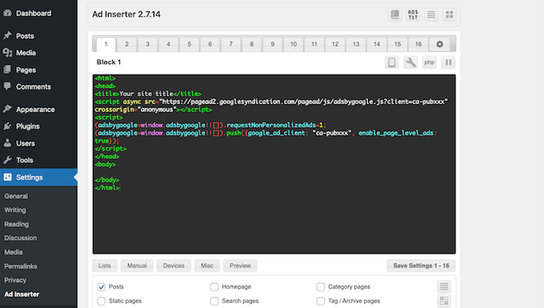
3.Select one of the numbered tabs to create a new ad block.
4.Paste the ad code (HTML, Javascript) into the main text box.
Configuring Ad Placement
- Choose where to insert the ad (e.g., before the content, after a specific paragraph).
- Set the ad alignment (left, right, center).
- Select on which pages or posts to display the ad.
- Set the display for specific devices.
- Configure the ad display frequency.
- Once you're satisfied with the settings, click the "Save Settings" button.
How to Enable Lazy Loading with Ad Inserter
Ad Inserter supports lazy loading for ads, but this feature is only available in the Pro version of the plugin. To implement lazy loading with Ad Inserter Pro, you can follow these steps:
- Install and activate Ad Inserter Pro on your WordPress site.
- Create a new ad block or edit an existing one.
- In the block settings, look for the lazy loading option. This should be available under the advanced settings of the block.
- Enable lazy loading for the desired ad block.
- Configure any additional lazy loading options, such as the activation distance or loading effect.
- Save the block settings.
Related Articles
How to Implement Lazy Loading
Summary Lazy loading is a technique that improves page speed and ad viewability by pausing the loading of ads until they are about to enter the user's viewport. It is ideal for long articles or pages with infinite scroll. This guide provides ...Complete Guide to Installing and Configuring The Moneytizer WordPress Plugin
Summary This comprehensive guide walks you through the simple steps to download, install, and configure The Moneytizer WordPress plugin. Learn how to easily integrate our ad formats, automatically set up your ads.txt file, and implement a consent ...How to Manually Integrate Ad Formats
Summary If you choose manual integration, you will be able to add the ad formats to your site yourself. In your Moneybox, you will find all the necessary information for each format, including its size, a demo of how it looks, and where it needs to ...How to Manually Integrate ads.txt on WordPress (Without FTP)
Summary It is possible to manually integrate your ads.txt file on a WordPress website without FTP access by using a simple WordPress plugin. This guide provides the step-by-step instructions to install and use the "File Manager" plugin to add the ...How to Manually Integrate a CMP Script on a WordPress Site
Summary This guide provides step-by-step instructions on how to manually integrate The Moneytizer's Consent Management Platform (CMP) script on a WordPress website using the theme editor. This method is an alternative to using a plugin and ensures ...